What a launch monitor does, and who needs one
A launch monitor measures what happens at impact and in the first part of the ball’s flight (ball speed, club speed, launch angle and, on better units, spin) and turns it into carry distance and shot shape. For Irish golfers it solves two problems. In summer it turns a bucket of balls at the range into useful information: how far each club really carries, so you stop coming up short with the wrong club. And through the long, wet winter, when courses go on to winter rules and temporary greens and it is dark before five, a launch monitor and a net in the garage or shed keep your swing ticking over until spring.
It is also a category where it pays to be sceptical. Prices run from under €200 to many thousands, cheaper units estimate a lot of what they show, and most well-known models need an app subscription for the fun parts. This guide explains the technology in plain terms, sorts the options by how you actually practise, and picks from what Amazon.ie itself sells. Amazon.ie’s own stock of launch monitors is thin: the Garmin Approach R10 and R50, the FlightScope Mevo range, Voice Caddie and Swing Caddie units, Bushnell Launch Pro, SkyTrak+ and Square Golf were not sold and dispatched by Amazon.ie when we checked, so they appear as search links filtered to Amazon.ie stock rather than as picks. If you are new to the game, a launch monitor is not the first thing to buy; start with our budget golf starter gear guide.
Radar or camera? How launch monitors measure a shot
Almost every personal launch monitor uses one of two technologies, or a mix of both, and the choice decides where it works best. Doppler radar units sit behind the ball and track it as it flies away (consumer units read the first part of the flight and calculate the rest), which suits the range and the practice ground but needs room depth indoors. Camera (photometric) units sit beside the ball and photograph it at impact, measuring launch and spin directly; they read well into a net only a few metres away, which suits a garage, but they calculate the rest of the flight rather than watching it, and they generally cost more.
| Type | Where it sits | What it does well | Watch out for | Examples |
|---|---|---|---|---|
| Doppler radar | Behind the ball, pointing down the target line | Ball and club speed, and reading the ball as it flies away outdoors | Needs room depth indoors; spin is often estimated, especially into a net | Garmin Approach R10, FlightScope Mevo range, Voice Caddie and Swing Caddie units |
| Camera (photometric) | Beside the ball, side-on | Launch angle, direction and spin measured at impact; reads well into a short net | Calculates the flight rather than tracking it; some need good lighting; generally pricier | SkyTrak+ (which adds radar for club data), Bushnell Launch Pro, Square Golf, Garmin Approach R50 |
| Camera and radar hybrid | Behind the ball | Speed from the radar, launch and strike video from the cameras | Spin is best with the maker’s marked balls; needs depth like a radar | Rapsodo MLM2PRO |
| Basic speed units | Near the ball | Club head and ball speed for speed training | Carry is an estimate worked out from speed; little or no spin data | Budget pocket units such as the SLX Hybrid Mini |
The Dublin Drop — Friday Deals
Price drops on Amazon.ie stock, once a week. No customs fees, no spam.
Free. No spam. Unsubscribe anytime. We only send verified domestic deals.
Which type suits how you practise
Start with where you will use it most. A unit that is brilliant on the range can be frustrating in a short garage, and a garage simulator can be overkill if all you want is to know your seven-iron carry. The sections below go through each use case in more detail.
| Use case | What matters most | Technology that suits | Where to start |
|---|---|---|---|
| Range carry numbers and gapping | Reliable carry and ball speed outdoors, quick set-up, battery life | Radar, or a camera and radar hybrid | Rapsodo MLM2PRO; Garmin Approach R10 or a Swing Caddie unit (search) |
| Home simulator in a garage or shed | Reads in a short space, works with simulator software, fits your room | Camera units, or a hybrid if you have the depth | Rapsodo MLM2PRO; SkyTrak+, Square Golf or Garmin Approach R50 (search) |
| Practice ground and on-course practice | Portable, quick to set up, copes with a breeze | Radar, or a hybrid | Rapsodo MLM2PRO; SLX Hybrid Mini for speed only |
| Coaching-grade numbers | Measured spin and club data you can trust shot to shot | High-end camera units, or a lesson on a professional’s launch monitor | A lesson or fitting first; Bushnell Launch Pro or SkyTrak+ (search) |
| Putting at home | Stroke and speed feedback on a short mat | Camera putting simulator | ExPutt EX500D Pro |
Our picks from Amazon.ie stock
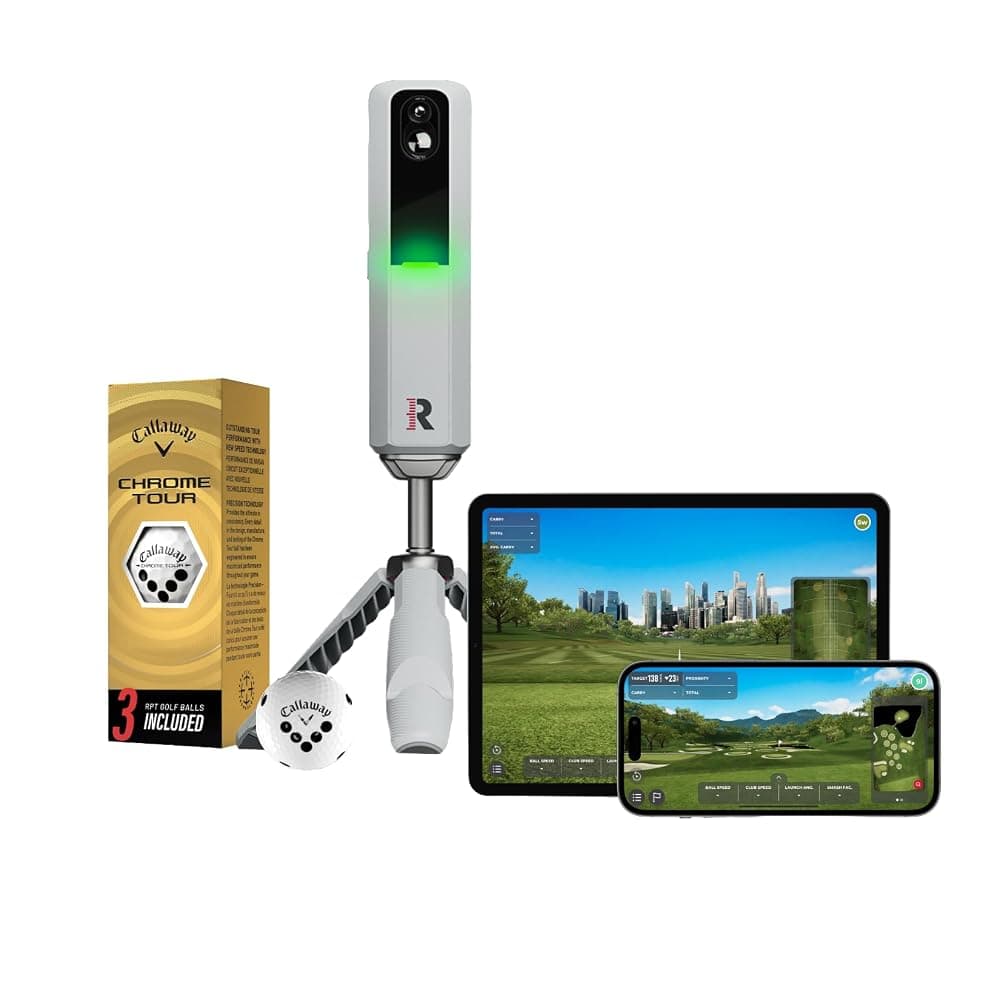
Rapsodo MLM2PRO Mobile Golf Launch Monitor and Simulator with 3 RPT Golf Balls (Grey)
Best for: Golfers who want one unit for range gapping in summer and a garage net in winter.
The MLM2PRO is the most versatile launch monitor we found in Amazon.ie’s own stock, and the one that best covers both the range and a garage net. It combines two built-in cameras with radar processing, and Rapsodo says it reports 13 metrics, six of them measured, including spin rate and spin axis. That spin measurement relies on Rapsodo’s marked RPT balls, and three come in the box; with ordinary balls, treat spin as an estimate. It sits on a tripod behind the ball, so indoors you need room depth behind you as well as space to the net: check Rapsodo’s minimum set-up distances against your garage before buying. Your numbers appear in the Rapsodo app on an iPhone, iPad or Android phone or tablet, and Impact Vision replays the strike in slow motion, which is a genuinely useful way to see heel and toe contact. Rapsodo Combines, a 24-shot skills test, gives you a repeatable score to track over a winter. The catch is the running cost: simulation on its 30,000-plus courses and several headline features, which may include some metrics, the video replays and Combines, sit behind Rapsodo’s paid membership, so check what the free tier and the current plan include, and what the plan costs, before you buy.
Pros
- Works on the range and indoors, with measured spin using the included RPT balls
- Impact Vision and Shot Vision video alongside the numbers (check which features need the membership)
- Apple and Android compatible
- Rapsodo Combines give you a repeatable skills test to measure progress
Cons
- Simulation and several features need a paid Rapsodo membership
- Sits behind the ball, so it needs more room depth indoors than side-of-ball camera units
- The listing also has an Amazon UK offer; make sure you choose the Amazon.ie one
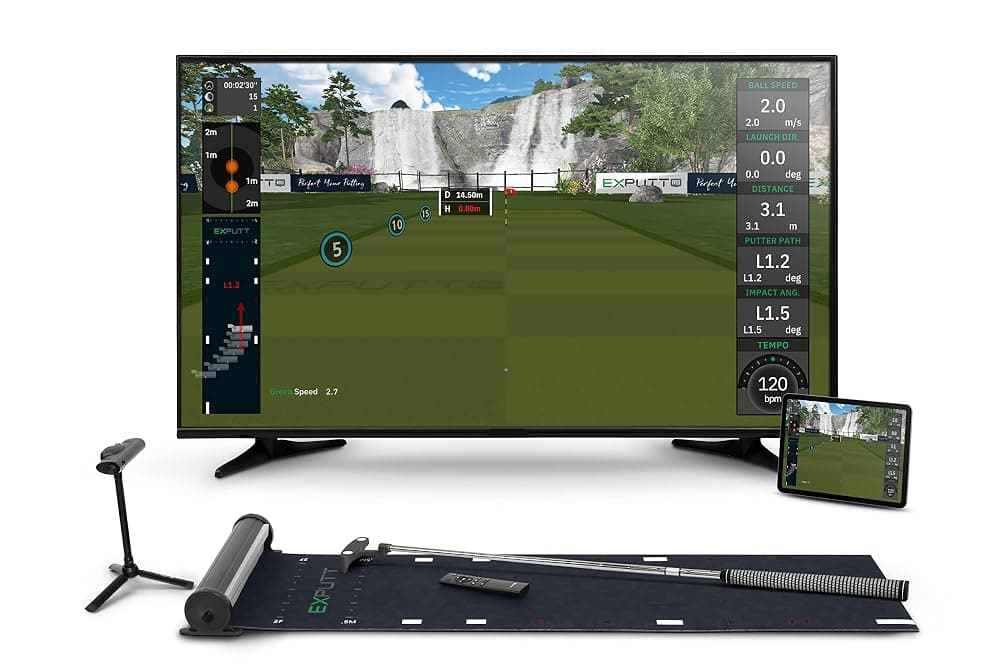
ExPutt EX500D Pro Golf Putting Simulator with High-Speed Camera, Putting Mat and TV Holder
Best for: Keen golfers with a TV and a bit of floor, and a winter game for the whole house.
Most launch monitors are no help on the greens, which is where the ExPutt comes in. It is a putting simulator rather than a launch monitor: a high-speed camera watches the putter and ball as you hit a real putt on the supplied mat, and the software plays the rest of the putt out on your TV, on greens modelled on more than 70 real courses, according to ExPutt. Because the roll is simulated, it needs far less floor than a real long putt, so it is one of the few golf gadgets that suits a living room or an apartment. Each stroke gets feedback on ball speed, putter path, face angle at impact and tempo, which helps with distance control and starting the ball on line. Practice, multiplayer and explorer modes, free online play against other owners and a Play9 mode for up to four players make it a decent winter-evening game too. You need your own putter, a TV with HDMI and USB sockets (the listing specifies a smart TV) and Wi-Fi. It does nothing for your long game and it is a big spend for putting alone, so it suits keen golfers whose full-swing practice is already sorted. Stock was low when we checked.
Pros
- Practise lag putting and slopes in a living room
- Feedback on ball speed, putter path, face angle and tempo
- Free online play, plus a Play9 mode for 1 to 4 players
Cons
- Putting only
- Needs a smart TV with HDMI and USB sockets, and Wi-Fi, according to the listing
- Low Amazon.ie stock when we checked
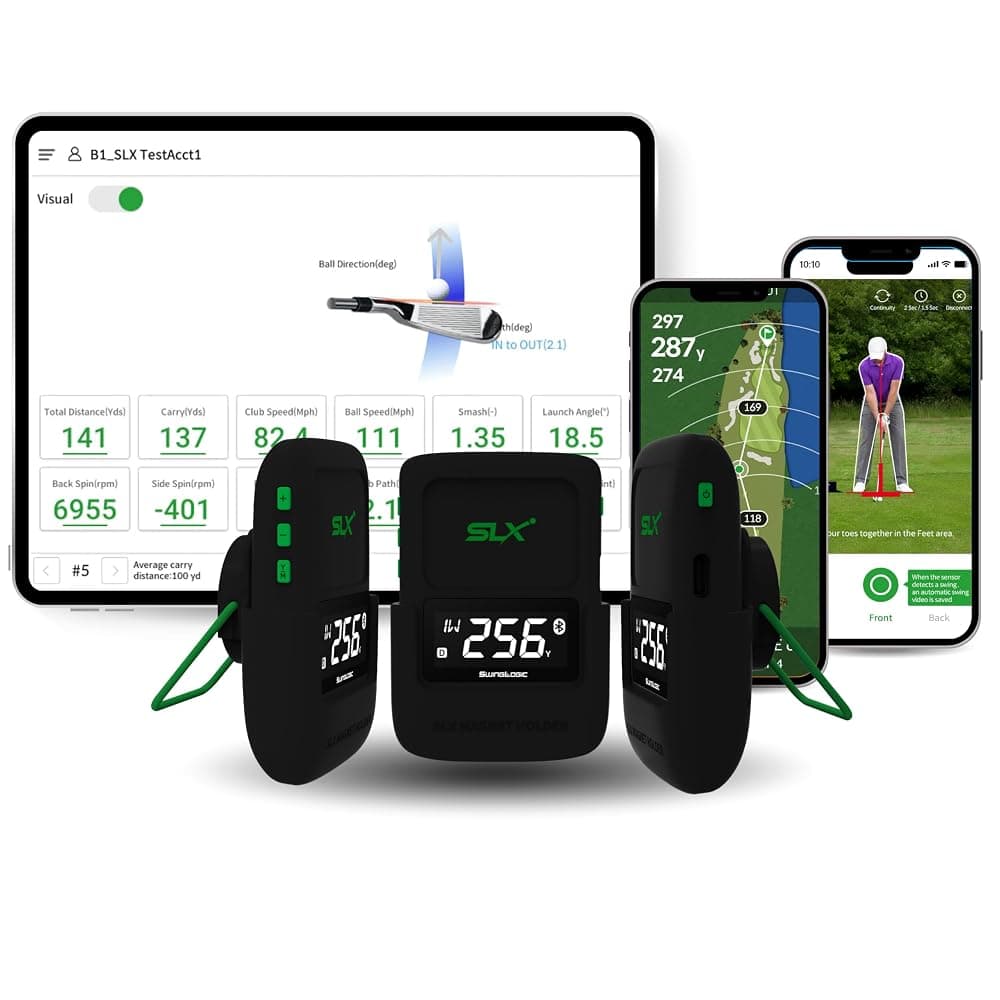
SLX Hybrid Mini Portable Golf Launch Monitor and GPS Device with Display
Best for: Speed training and range sessions on a budget, or a modest gift for a numbers-curious golfer.
If all you want is club head speed, ball speed and a rough carry figure at the range, for a fraction of the cost of a simulator-capable unit, the SLX Hybrid Mini is the cheapest launch monitor we found sold by Amazon.ie. The listing says it is made by Swing Logic and sold under the Second Chance name, and that it reports ball speed, club head speed, smash factor and distance, pairs by Bluetooth with an app that records swing video, and doubles as a golf GPS device. Be clear-eyed about what that means. The listing does not explain how it measures, or whether it reads launch angle or spin, so treat its distances as estimates and use it for what speed-based units do well: tracking club head speed, and smash factor as a measure of strike quality, from one session to the next. It is small enough to live in the bag. Check that the app supports your phone before buying, and keep the packaging in case it does not suit.
Pros
- The lowest-cost launch monitor we found in Amazon.ie stock
- Club head speed, ball speed and smash factor for speed and strike work
- Pocket-sized, with swing video in the app
Cons
- Thin technical detail on the listing; treat distances as estimates
- No measured spin or full simulation listed
- Phone compatibility is not spelled out on the listing
The best-known launch monitors were not in Amazon.ie’s own stock when we checked. Amazon.ie’s range changes, so the links below search Amazon.ie stock only; if nothing comes up as sold by Amazon.ie, check back nearer Black Friday or buy from an EU-based golf retailer. The older Rapsodo MLM, which works with iPhone and iPad only, appeared on Amazon.ie but was offered only by Amazon UK through Amazon Global Store, so we have left it out.
Launch monitors to check in Amazon.ie stock
Links open an Amazon.ie search filtered to items sold & dispatched by Amazon.ie. Availability changes.
- Search Amazon.ie
Garmin Approach R10
Garmin’s portable radar unit sits behind the ball and pairs with the Garmin Golf app on iPhone or Android. A popular choice for range gapping and indoor nets with enough room depth. Home Tee Hero virtual rounds need a Garmin Golf membership, and spin figures from radar units at this level are largely estimated.
- Search Amazon.ie
Garmin Approach R50
Garmin’s camera-based unit sits beside the ball and has its own built-in display, aimed at home simulators. A big step up in price from the R10.
- Search Amazon.ie
FlightScope Mevo range (Mevo Gen 2, Mevo+)
FlightScope’s radar units sit behind the ball and use the FS Golf app on iPhone and Android. Mevo+ is the more capable model, with an optional paid Pro Package that adds more club data. Check what the current package includes, which metrics each model measures and which courses or upgrades cost extra.
- Search Amazon.ie
Voice Caddie and Swing Caddie (SC4, SC4 Pro, SC300i)
Small radar units with their own screen, popular at the range because you can read carry and speed without looking at a phone. Higher models add more data and simulator features; check which numbers are measured and which are estimated.
- Search Amazon.ie
Bushnell Launch Pro
A side-of-ball camera unit based on Foresight Sports’ GC3. Which ball and club data you get depends on the subscription tier, so check Bushnell’s current plans.
- Search Amazon.ie
SkyTrak+
A side-of-ball camera unit that adds radar for club data, built mainly for indoor simulators. Most features depend on a SkyTrak membership plan, and it works with third-party simulator software (check which plan that needs).
- Search Amazon.ie
Square Golf
A compact side-of-ball camera unit designed for home simulators, with its own game software. Check the space guidance, the devices it supports and any subscription before buying.
Our picks at a glance
| Rapsodo MLM2PRO | ExPutt EX500D Pro | SLX Hybrid Mini | |
|---|---|---|---|
| What it is | Launch monitor and simulator | Putting simulator | Pocket launch monitor and golf GPS |
| How it measures | Two cameras plus radar | High-speed camera | Not stated on the listing |
| Spin | Measured with the included RPT balls | Not applicable | Not listed |
| Indoors or outdoors | Both | Indoors | Range and course |
| Works with | iPhone, iPad, Android phones and tablets | A smart TV with HDMI and USB, plus Wi-Fi; the listing also mentions mobile devices | A smartphone or tablet app (check your platform) |
| Subscription | Paid membership for simulation and some features | Online play is free, according to the listing | Not stated; check the app |
| Power | Rechargeable, USB charging cable | USB and HDMI connection to the TV | Rechargeable, USB-C |
| Rough budget | €600–€750 | €400–€500 | Under €200 |
| Best for | Range gapping and a garage net | Putting practice at home | Speed training on a budget |
1. Driving range carry numbers and gapping
Gapping means knowing how far each club carries, so you have sensible gaps through the bag and no two clubs doing the same job. It is the single most useful thing a launch monitor does for most club golfers. Carry is the number to learn: on soft Irish fairways and greens, especially from October to April, the ball does not run much, so how far it flies decides whether you clear the bunker or the drain in front of the green. Driving ranges and pay-and-play par-3 courses are the cheapest way to get regular practice in Ireland, and a launch monitor turns a range bucket from hitting balls into actual information.
- Radar suits the range. It reads the ball as it flies away, it sets up behind you in a bay in a minute or two, and it is not bothered by daylight. Place it where the maker says, usually a couple of metres behind the ball, and line it up with your target.
- Range balls distort the numbers. Many ranges use limited-flight or well-worn balls that fly shorter and spin differently. Treat range numbers as relative (your seven-iron against your eight-iron) and do a proper gapping session with the ball you play, on your club’s practice ground if it has one.
- Average, do not cherry-pick. Hit 10 or more balls with each club and use the typical carry, not the best one. Most apps show averages and dispersion for you.
- Check the range is happy with it. Most ranges do not mind a launch monitor behind you, but busy covered bays with posts or nets either side can confuse some radar units. Some Irish ranges also have ball-tracking built into the bays, which gives you numbers for the price of a bucket; it is worth trying before you buy your own.
2. A home simulator in a garage, shed or spare room
A garage or shed set-up is the reason many Irish golfers buy a launch monitor: when it is lashing rain and the course is on temporary greens, twenty minutes into a net keeps your swing going. The launch monitor is only one part of it. You also need a net or impact screen, a decent hitting mat, a way to see the numbers (a phone or tablet on a stand is fine to start; a TV or projector comes later), and enough room to swing a driver safely.
| Measurement | Rough guide | Why it matters |
|---|---|---|
| Ceiling height | About 2.7–3m (9–10ft) for a full driver swing for most adults; taller golfers need more | The club has to clear the ceiling at the top of the backswing and in the follow-through. Many garages, sheds and box rooms are lower, which can limit you to shorter clubs. |
| Width | About 3–3.5m for one golfer; more if right- and left-handers share it | Room to swing without hitting walls, and space for a side-of-ball camera unit. |
| Ball to net or screen | Usually at least 2.5–3m | Gives the sensor enough ball flight to read and the net time to absorb the ball safely. |
| Total depth, camera unit beside the ball | Roughly 4m or more | Ball-to-net distance plus room behind you to swing. |
| Total depth, radar or hybrid behind the ball | Often 4.5–5m or more | The unit sits a couple of metres behind the ball, and radar needs ball flight in front of it. |
- Use a proper net and real balls. Most launch monitors need real golf balls to read properly, so foam practice balls are out. A strong net with side barriers, set back from the wall so it does not bounce balls back at you, matters more than the launch monitor for safety.
- Mind the mat on concrete. Most Irish garages have a concrete floor, and a thin mat on concrete jars wrists and elbows on heavy shots. A thicker hitting mat is worth the money.
- Check the lighting guidance. Some camera-based units need a reasonably well-lit room, while others have their own built-in lighting. A single dim bulb in a garage may not be enough, so check the maker’s indoor set-up advice.
- Damp and cold. Irish garages and sheds are often cold and damp. Keep the launch monitor, tablet and balls in the house between sessions rather than in the garage; if anything has been left out in the cold, let it warm up to room temperature before you use or charge it, to avoid condensation. Balls kept indoors also behave more consistently than cold ones. A dehumidifier helps protect the room and the net; see our dehumidifier guide.
- A tablet makes it more fun. A bigger screen makes the numbers and simulator courses easier to see from the mat; our tablets guide covers good options. Full simulator software on a PC and projector is a bigger project, covered under subscriptions below.
3. Practice ground and on-course practice
If your club has a practice ground, a launch monitor makes those sessions far more useful, and you are hitting your own balls, so the numbers mean more than at a range. Radar and hybrid units are the natural fit outdoors because they read the ball as it flies away from them. Some apps also include target games or virtual holes, which make a practice session feel more like playing.
- Keep it dry. Few launch monitors are designed to be rained on. In an Irish shower, cover the unit or stop; dry it, and its tripod, before it goes back in the bag.
- Wind and cold change real distances. Many consumer units calculate carry from launch data rather than tracking the whole flight, so a stiff breeze on a links course or along the coast can make the real result very different from the screen. Cold air and cold balls also fly shorter, so your January carries will not match your June ones.
- Practice only, not competitions. The Rules of Golf restrict using equipment to analyse your swing or interpret shot data during a round, so keep the launch monitor for practice, not for competitions or rounds you submit for handicap. Check your club’s rules before hitting practice shots on the course itself.
- Watch the battery. A long session drains the unit and the phone running the app. A small power bank keeps the phone going; see our power banks and chargers guide.
4. Coaching-grade numbers
The launch monitors that coaches and club fitters rely on, such as TrackMan and Foresight’s GCQuad, cost many times more than anything on this page and are generally sold through specialist dealers. For most golfers the best-value way to get numbers of that standard is to book a lesson or a fitting with a PGA professional who uses one; many Irish club professionals and golf centres have one in their studio. Use a personal launch monitor at home to keep track of trends between lessons rather than to replace them.
If you do want the nearest thing at home, look at side-of-ball camera units such as the Bushnell Launch Pro, SkyTrak+, Square Golf or Garmin Approach R50, or FlightScope’s Mevo+ with its optional Pro Package. Camera units measure spin and launch directly at impact, which is what matters in a garage, but club data (path, face angle and attack angle) varies a lot between models and is sometimes locked behind a higher subscription tier. Check exactly which club metrics are measured before you pay for them, and if you are being fitted for new clubs, do that on the fitter’s equipment rather than your own.
Subscriptions and software: the running costs
The price on the box is rarely the whole story. Most launch monitors show basic numbers for free, but simulated courses, some metrics and the more fun practice modes often need a membership, and full PC simulator software is usually a separate licence. Over a few winters that can add up to a good share of the unit’s price. Plans and prices change often, so treat this as a guide and check the current terms on the maker’s site before you buy.
| Brand or software | What a subscription typically adds | What to check |
|---|---|---|
| Rapsodo (MLM2PRO) | Simulated courses and several features, including some metrics | Whether a trial is included, and the current plan price |
| Garmin (Approach R10, R50) | Home Tee Hero virtual rounds on the R10 need a Garmin Golf membership | Current Garmin Golf pricing, what the R50’s built-in software includes, and that third-party simulator software is separate |
| FlightScope (Mevo range) | The FS Golf app covers the basics; the Mevo+ Pro Package and many simulator courses cost extra | Which upgrades and course packs you actually need |
| SkyTrak+ | Most features depend on a SkyTrak membership plan | Which plan includes the features you want |
| Bushnell Launch Pro | Ball and club data depend on the subscription tier | What each tier unlocks |
| GSPro, E6 Connect and other simulator software | Courses and play on a big screen, sold as separate licences or subscriptions | GSPro runs on a Windows PC with a capable graphics card; check your launch monitor is supported |
| ExPutt | The listing says online play against other ExPutt users is free | Any paid course or mode add-ons |
Buying a launch monitor in Ireland
A launch monitor is exactly the kind of high-value electronics where buying from Great Britain can catch you out. Since Brexit an order shipped from Britain is an import: Irish VAT at the standard 23% is due on the full value plus postage, customs duty may apply above €150 to goods that were not made in the UK (few launch monitors are), and a carrier can add a handling fee if the charges were not paid at checkout. Import VAT, duty and handling fees paid on delivery are generally not refunded if you send the item back. Our customs charges explainer covers the rules, and our customs calculator estimates the extra cost on a UK order.
Buying from Amazon.ie keeps things simple. The item ships from within the EU, there are no import charges at the door, and if something goes wrong you deal with an EU seller under EU consumer rights. That matters with electronics that rely on firmware updates and apps, where a fault can take a while to show up. We explain why we only list Amazon.ie stock separately.
What to check before you buy
- Decide the use case first. Range gapping, a garage simulator, practice-ground sessions or coaching-grade data each point to a different kind of unit. Buying for the wrong one is the most common mistake.
- Find out what is measured. Look for the maker’s list of measured metrics, especially spin. If spin is calculated, trust it less, particularly indoors.
- Measure your room against the maker’s minimum. Ceiling, width, depth behind the ball and ball-to-net distance all matter, and they differ between radar and camera units.
- Check device compatibility. iPhone, Android, iPad or Windows PC: confirm the app and any simulator software you want supports your devices.
- Add up the running costs. Membership, simulator software, a net, a mat, a tablet stand, and possibly a projector and screen. Budget for the whole set-up, not just the unit.
- Charging, not plugs. The units on this page charge over USB, so the plug type does not matter. Use a decent USB charger, and keep the unit out of a cold, damp garage between sessions.
- Check the seller on the exact offer. Look for Ships from and sold by Amazon.ie, or Shipper / Seller Amazon.ie, on the option you add to your basket.
- Remember the basics. Numbers will not fix a swing on their own. If you are still finding your feet, a few lessons and a set of clubs that suits you come first; see our budget golf starter gear guide.
Everything on this page is limited to stock sold and dispatched by Amazon.ie, so there are no import charges on delivery and you have EU consumer rights if something goes wrong. To browse more, see the Sports & Outdoors category.
A gift for the golfer who has everything
Launch monitors are a classic present for the golfer who already has the membership, the bag, the GPS watch and more balls than they will ever lose. They are also easy to get wrong, so check a few things quietly first: what phone they use, whether they have a garage, shed or spare room with the height for a full swing, and whether they would actually pay for an ongoing membership. If any of that is uncertain, the ExPutt is the safer big gift because it only needs a TV and a bit of floor, and the SLX Hybrid Mini is a lower-risk way to test the interest.
Buy early for Christmas, keep the box, and check the seller on the exact offer. Our Amazon.ie returns guide explains the returns window, and our Black Friday 2026 guide explains how to spot a genuine reduction. For more ideas, see our gifts for him, Christmas gift guide and Kris Kindle gift ideas.